SOLIDWORKS ON THE GO
HP ZBook Firefly G11 A and Power G11 A, AMD-powered mobile workstations optimized for SOLIDWORKS and AI workflows, offering strong performance, integrated graphics, and portability for CAD professionals.
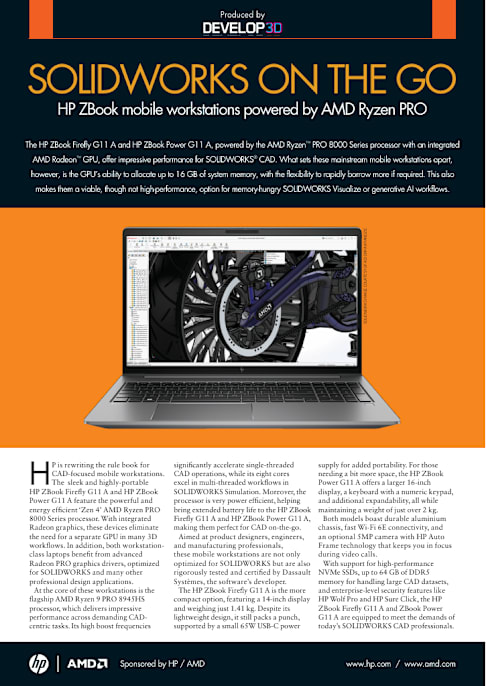
SOLIDWORKS ON THE GO HP ZBook mobile workstations powered by AMD Ryzen PRO
H P is rewriting the rule book for CAD-focused mobile workstations. The sleek and highly-portable HP ZBook Firefly G11 A and HP ZBook Power G11 A feature the powerful and energy efficient ‘Zen 4’ AMD Ryzen PRO 8000 Series processor. With integrated Radeon graphics, these devices eliminate the need for a separate GPU in many 3D workflows. In addition, both workstation- class laptops benefit from advanced Radeon PRO graphics drivers, optimized for SOLIDWORKS and many other professional design applications.
At the core of these workstations is the flagship AMD Ryzen 9 PRO 8945HS processor, which delivers impressive performance across demanding CAD- centric tasks. Its high boost frequencies
significantly accelerate single-threaded CAD operations, while its eight cores excel in multi-threaded workflows in SOLIDWORKS Simulation. Moreover, the processor is very power efficient, helping bring extended battery life to the HP ZBook Firefly G11 A and HP ZBook Power G11 A, making them perfect for CAD on-the-go.
Aimed at product designers, engineers, and manufacturing professionals, these mobile workstations are not only optimized for SOLIDWORKS but are also rigorously tested and certified by Dassault Systèmes, the software’s developer.
The HP ZBook Firefly G11 A is the more compact option, featuring a 14-inch display and weighing just 1.41 kg. Despite its lightweight design, it still packs a punch, supported by a small 65W USB-C power
supply for added portability. For those needing a bit more space, the HP ZBook Power G11 A offers a larger 16-inch display, a keyboard with a numeric keypad, and additional expandability, all while maintaining a weight of just over 2 kg.
Both models boast durable aluminium chassis, fast Wi-Fi 6E connectivity, and an optional 5MP camera with HP Auto Frame technology that keeps you in focus during video calls.
With support for high-performance NVMe SSDs, up to 64 GB of DDR5 memory for handling large CAD datasets, and enterprise-level security features like HP Wolf Pro and HP Sure Click, the HP ZBook Firefly G11 A and ZBook Power G11 A are equipped to meet the demands of today’s SOLIDWORKS CAD professionals.
Produced by
Sponsored by HP / AMD www.hp.com / www.amd.com
SO LI
D W
O R
KS IM
AG E
CO U
R TE
SY O
F AD
I D R
PA X
PA N
D ZI
C
The HP ZBook Firefly G11 A and HP ZBook Power G11 A, powered by the AMD Ryzen™ PRO 8000 Series processor with an integrated
AMD Radeon™ GPU, offer impressive performance for SOLIDWORKS® CAD. What sets these mainstream mobile workstations apart,
however, is the GPU’s ability to allocate up to 16 GB of system memory, with the flexibility to rapidly borrow more if required. This also
makes them a viable, though not high-performance, option for memory-hungry SOLIDWORKS Visualize or generative AI workflows.
https://www.develop3d.com
2
For 3D CAD, designers and engineers have historically been best served by mobile workstations with a separate CPU (Central Processing Unit) and GPU (Graphics Processing Unit).
Processors with integrated graphics have often fallen short, struggling with raw 3D performance, lacking application-specific optimizations, and missing crucial CAD software certifications. In SOLIDWORKS, for instance, uncertified graphics processors do not support certain features, such as RealView for advanced real-time rendering.
However, the AMD Ryzen PRO 8000 Series processor, at the heart of the HP ZBook Firefly G11 A and HP ZBook Power G11 A, looks set to change the way designers and engineers think about integrated graphics.
The top-end AMD Ryzen 9 PRO 8945HS, for example, comes with powerful AMD Radeon 780M graphics that delivers a smooth interactive viewport
experience in SOLIDWORKS, even when working with large assemblies.
This is driven by the raw power of AMD’s RDNA3 graphics architecture and the option to allocate up to 16 GB of system memory exclusively for graphics. This isn’t strictly necessary, however, as the GPU can dynamically borrow additional memory from the system when needed, without suffering the significant performance loss often seen when a discrete GPU does the same.
ADVANCED 3D GRAPHICS FOR CAD When it comes to 3D graphics, SOLIDWORKS is one of the most advanced CAD tools available. The software utilizes OpenGL’s ‘retained rendering’ mode, which stores more data in GPU memory, allowing for faster and more efficient rendering. Many key algorithms in the SOLIDWORKS graphics engine rely heavily on the GPU. These include Ambient
Occlusion for more realistic shadows; Anti-Aliasing for smoother edges; Order Independent Transparency (OIT) for faster and more accurate transparent objects; and Occlusion Culling, which does not render objects that are obscured by others.
By dedicating up to 16 GB of memory for graphics, both HP laptops can buffer more information on the GPU, reducing the need for the CPU to continuously feed in data and significantly enhancing performance.
To put this into perspective, a complex SOLIDWORKS motorbike assembly requires 5.2 GB of GPU memory when viewed in shaded-with-edges display mode at 1,920 x 1,200 resolution. With the AMD Ryzen 9 PRO 8945HS processor, the HP ZBook Firefly G11 A achieves a smooth 31 frames per second (FPS)—well above the minimum recommended 24 FPS. Achieving this level of 3D performance previously required a mobile workstation with a discrete GPU.
A NEW ERA OF MOBILE GRAPHICS The AMD Ryzen PRO Series processor, at the heart of the HP ZBook Firefly G11 A and HP ZBook Power G11 A, looks set to change the way product designers and engineers think about integrated graphics
Sponsored by HP / AMD www.hp.com / www.amd.com
3
The HP ZBook Firefly G11 A and HP ZBook Power G11 A are extremely well placed to harness the power of AI, as it plays an increasingly important role in the workflows of designers and engineers.
Powered by the AMD Ryzen PRO 8000 Series processor, these mobile workstations feature a dedicated AI engine, known as a Neural Processing Unit (NPU). This NPU is optimized to handle AI tasks more efficiently than the CPU or GPU, consuming less power and therefore extending battery life when away from the desk. By offloading tasks such as natural language processing and AI-enhanced video conferencing features like background blurring, eye tracking, auto-framing, and noise suppression, the NPU frees up the CPU and GPU for other performance-intensive tasks.
For more complex AI applications, the NPU works in tandem with the Radeon
integrated graphics, leveraging shared system memory for efficient data transfer. With up to 64 GB of configurable system memory available in these HP laptops, there’s plenty of capacity for demanding AI workflows.
One such demanding application of AI that is gaining traction in product design is generative AI, exemplified by models like Stable Diffusion.
The Stable Diffusion model is accessible through Amuse, a free software tool optimized for the AMD Ryzen PRO 8000 Series processors. Amuse allows designers to generate a wide range of design variations based on text prompts. By refining these prompts to focus on specific design aspects such as color or material, designers can ensure that the generated images align with the project brief. Stable Diffusion can also be customized for more controlled outputs, guiding the design in terms of composition, themes, and styles.
ACCELERATING AI WORKFLOWS With advanced AI processing spread across the Neural Processing Unit (NPU) and GPU, the HP ZBook Firefly G11 A and HP ZBook Power G11 A are well placed to support rapidly evolving AI workflows
Sponsored by HP / AMD www.hp.com / www.amd.com
Specs HP ZBook Firefly 14-inch G11 A HP ZBook Power 16-inch G11 A
Processor Up to AMD Ryzen 9 PRO 8945HS with Radeon 780M Graphics Up to AMD Ryzen 9 PRO 8945HS with Radeon 780M Graphics
Memory Up to 64 GB DDR5-5600 non-ECC SODIMM Up to 64 GB DDR5-5600 non-ECC SDRAM
Storage Up to 2 TB PCIe Gen4 x4 NVMe M.2 2280 TLC SSD Up to 2 x 4 TB PCIe Gen4 x4 NVMe M.2 2280 TLC SSD
Display 14-inch display up to WQXGA (2,560 x 1,600), 500 nits, HP DreamColor 16--inch display up to QHD (2,560 x 1,600), IPS, 400 nits
Ports 2 x USB Type-A • HDMI 2.1b
2 x Thunderbolt 4 with USB4 Type-C (DisplayPort 1.4) headphone/microphone combo
2 x USB Type-A • HDMI 2.1 • 2 x Thunderbolt 4 with USB Type-C 40Gbps (DisplayPort 2.1) • headphone/microphone combo
RJ-45 (Ethernet) • power connector
Keyboard HP Premium Quiet Keyboard, full-size HP Premium Quiet Keyboard, full-size with numeric keypad
Battery HP Long Life 3-cell, 56 Wh Li-ion polymer HP Long Life 6-cell, 83 Wh Li-ion polymer
Power HP Smart 65 W External AC USB Type-C power adapter 150 W Slim Smart external AC power adapter
Dimensions 31.56 x 22.43 x 1.99 cm 35.94 x 25.1 x 2.29 cm
Weight Starting at 1.41 kg Starting at 2.04 kg
Certification Pending certification for SOLIDWORKS 2022-2024 Pending certification for SOLIDWORKS 2022-2024
CR ED
IT : E
D D
IE M
AU R
O -
W W
W .IN
ST AG
R AM
.C O
M /E
D D
IE M
AU R
O .D
ES IG
N
GENERATED BY STABLE DIFFUSION PRODUCT DESIGN MINIMALISM (CHECKPOINT) PROMPT: 3D PRODUCT RENDER, FUTURISTIC HELMET, FINELY DETAILED, PURISM, UE 5, A COMPUTER RENDERING, MINIMALISM, OCTANE RENDER, 4K
https://www.hp.com/us-en/workstations/zbook-firefly.html https://www.hp.com/us-en/workstations/zbook-power.html
4
THE DESIGN COMPANION The HP ZBook Firefly G11 A is a premium mobile workstation packed with advanced features to satisfy the significant demands of product design, engineering, and manufacturing professionals
Sponsored by HP / AMD www.hp.com / www.amd.com
GET CONNECTED With fast Wi-Fi 6E and optional 5G WWAN, the HP ZBook Firefly G11 A enables you to stay connected wherever your work may take you. It’s also extremely well equipped with ports, and connects to the HP Thunderbolt Dock 120 W G4 via a single USB-C cable, taking the total number of supported displays up to four.
●1 HDMI 2.1b for external displays ●2 SuperSpeed USB Type-A 5Gbps ●3 Thunderbolt 4 with USB4 Type-C 40Gbps signalling rate (USB Power Delivery, DisplayPort 1.4 for external displays) ●4 Smartcard Reader (optional) ●5 SIM Card Slot (optional) ●6 SuperSpeed USB Type-A 5Gbps (charging) ●7 Audio Combo Jack
CRYSTAL CLEAR The HP ZBook Firefly G11 A is engineered for precision, with its 14-inch HP DreamColor WQXGA (2,560 x 1,600 resolution) display that delivers super sharp detail for precise CAD work. The 120 Hz IPS panel with 100% DCI-P3 ensures smooth 3D model navigation and vibrant colors, while 500 nits brightness boosts visibility even in direct sunlight, perfect for CAD on the go.
There are several alternatives, including a WUXGA (1,920 x 1,200) anti-glare IPS panel, which features 100% sRGB coverage and a remarkable 1,000 nits of brightness. This model also includes HP Sure View Reflect, a privacy screen that reduces visible light from side angles by up to 95%, safeguarding your confidential design work.
1 2
3 3
7 6
5
5Sponsored by HP / AMD www.hp.com / www.amd.com
PRECISE INPUT The HP ZBook Firefly G11 A comes with a large Clickpad with multi-touch gesture
support for easier, more intuitive input Meanwhile, in desktop settings, for enhanced
control and navigation in SOLIDWORKS. Bluetooth 5.3 and USB (Type A or C)
connectivity gives plenty of options for an external mouse or 3Dconnexion SpaceMouse.
PORTABLE POWER With a choice of AMD Ryzen PRO processors, including
the powerful Ryzen 9 PRO 8945HS and its integrated Radeon 780M graphics, this mobile workstation handles
a wide range of demanding tasks with ease. It delivers high frequencies for single-threaded applications like
SOLIDWORKS CAD, while its 8 cores and 16 threads propel multi-threaded workflows, such as Finite
Element Analysis (FEA) in SOLIDWORKS Simulation. Impressively, it achieves all this while drawing a maximum
of just 65 W from a USB Type-C power adapter. Its low power requirement also helps get the most out of its HP
Long Life 3-cell, 56 Wh Li-ion polymer battery.
ADVANCED SECURITY The HP ZBook Firefly G11 A is loaded with top-tier security features, led by HP Wolf Security for Business, which provides a hardware-enforced, always-on defence from BIOS to browser. It includes HP Sure Click, isolating risky tasks in micro virtual machines (VMs), and HP Sure Sense, using AI to block malware. Additional features include a fingerprint reader, optional self-encrypting drives, and HP Secure Erase for wiping sensitive data.
FINGERTIP CONTROL The HP ZBook Firefly G11 A comes with an optional touch-enabled displays, perfect for
effortlessly scrolling through websites, annotating drawings, or navigating presentations with ease.
LIGHT TOUCH With a sleek profile of just 19.9 mm and a starting weight of 1.41 kg, the HP ZBook Firefly G11 A is among the thinnest and lightest mobile workstations available. Its durable aluminium chassis makes it ideal for CAD on-the- go, combining portability with robust performance.
4
COOL AND QUIET The HP ZBook Firefly G11 A is notably quiet, virtually
silent when modelling in SOLIDWORKS CAD. Even at peak load, when GPU rendering in SOLIDWORKS Visualize, fan noise remains minimal. This is achieved
through advanced thermal management and the highly energy-efficient AMD Ryzen PRO 8000 Series processor.
SO LID
W O
RKS IM AGE CO
U RTESY O
F AD I D
RPAX PAN D
ZIC
TEAM PLAYER The HP ZBook Firefly G11 A is packed with
features to get the most out of your Microsoft Teams or Zoom meetings. The 5-megapixel IR camera, complete with privacy shutter, utilizes
HP Auto Frame to automatically track and follow presenters, keeping them centred and in
focus. Additionally, AI-powered noise reduction software minimizes unwanted background sounds, delivering crystal-clear audio for professional calls.
6
THE PORTABLE POWERHOUSE The HP ZBook Firefly G11 A delivers impressive 3D performance in SOLIDWORKS. Despite its entry-level AMD Radeon GPU, it can handle surprisingly large assemblies, offering a smooth modelling experience for designers. To assess its capabilities, we tested it with three different SOLIDWORKS models
Sponsored by HP / AMD www.hp.com / www.amd.com
COMPUTER MODEL MODEL STATISTICS NUMBER OF COMPONENTS = 296 NUMBER OF TRIANGLES = 3,634,648 GPU MEMORY FOOTPRINT - SHADED WITH EDGES @ 1,920 X 1,200 PIXELS = 2.1 GB GPU MEMORY FOOTPRINT - REALVIEW @ 3,840 X 2,160 PIXELS = 3.2 GB
This is a more complex SOLIDWORKS assembly, with the mesh on the computer chassis placing bigger demands on the GPU. Despite this increased computational load, the HP ZBook Firefly G11 A still delivers an incredibly fluid viewport at 44+ frames per second (FPS), even when plugged into an external 4K monitor, and even when RealView and Ambient Occlusion are enabled for realistic lighting, shadows, and materials. As the model requires up to 3.2 GB of GPU memory, there’s a small benefit to dedicating 8 GB of GPU memory, especially if other applications are running at the same time, but it’s not essential.
SEADOO MODEL MODEL STATISTICS NUMBER OF COMPONENTS = 73 NUMBER OF TRIANGLES = 506,936 GPU MEMORY FOOTPRINT - SHADED WITH EDGES @ 1,920 X 1,200 PIXELS = 1.3 GB GPU MEMORY FOOTPRINT - REALVIEW @ 3,840 X 2,160 PIXELS = 2.1 GB
This is a relatively simple SOLIDWORKS assembly, but not atypical of those used in product design. The HP ZBook Firefly G11 A doesn’t even break into a sweat in all display modes and at all resolutions, delivering frame rates in the hundreds, well over the desired minimum 24 frames per second (FPS). As the model requires 1.3 GB of GPU memory, rising to 2.1 GB at 4K resolution with RealView and Ambient Occlusion enabled, on paper, there’s a small benefit to dedicating more system memory specifically to the GPU. However, in reality this won’t matter when the performance is so high anyway.
0 100
200 300
400 500
600 700
800
1,920 x 1,200
Shaded with edges
512 MB GPU profile
16 GB GPU profile SEADOO MODEL PERFORMANCE Frames Per Second (FPS) - bigger is better
572
1,920 x 1,200
RealView 1,920 x 1,200
RealView with AO
3,840 x 2,160
Shaded with edges
3,840 x 2,160
RealView 3,840 x 2,160
RealView with AO
618
365 389
208 213 198 204 136 143
61 66
0 50
100 150
200
1,920 x 1,200
Shaded with edges
512 MB GPU profile
16 GB GPU profile COMPUTER MODEL PERFORMANCE Frames Per Second (FPS) - bigger is better
194
1,920 x 1,200
RealView 1,920 x 1,200
RealView with AO
3,840 x 2,160
Shaded with edges
3,840 x 2,160
RealView 3,840 x 2,160
RealView with AO
200
114 117 89 94
102 100
62 64 44 44
7
THE PORTABLE POWERHOUSE
Sponsored by HP / AMD www.hp.com / www.amd.com
TUNING UP THE GPU
The HP ZBook Firefly G11 A has a setting in the BIOS that allows the user to allocate a specific amount of system memory for graphics or ‘video’. When there is sufficient installed memory, one can choose between 512 MB, 8 GB or 16 GB. For SOLIDWORKS, we recommend 8 GB and for SOLIDWORKS Visualize 16 GB. However, if system memory is in short supply, one can set it to 512 MB and the GPU will grab what it needs as and when required. This will have a small impact on 3D performance (see testing left).
Switch on the HP ZBook Firefly G11 A and immediately hit the ‘esc’ key repeatedly to enter the Startup Menu. Next, select ‘BIOS Setup’ (F10), then click on the ‘Advanced’ tab, then ‘Built in Device Options’
Under ‘video memory size’ select your preferred profile, then, press escape twice and ‘save changes’ yes. That’s all you need to do. The machine will then reboot with the new GPU memory profile
To check the profile, log into Windows, right click on the taskbar and select ‘Task Manager’. Then click performance (2nd icon down on the left) and you’ll see the allocation. In the case below, where our workstation was fitted with 64 GB, there is 16 GB of dedicated GPU memory with a potential total maximum of 39.9 GB!
MOTORBIKE MODEL MODEL STATISTICS NUMBER OF COMPONENTS = 2,206 NUMBER OF TRIANGLES = N/A GPU MEMORY FOOTPRINT - SHADED WITH EDGES @ 1,920 X 1,200 PIXELS = 5.2 GB GPU MEMORY FOOTPRINT - REALVIEW @ 3,840 X 2,160 PIXELS = 6.6 GB
This is a very complex SOLIDWORKS assembly, with engineering level of detail and over 2,000 components. It uses up to 6.6 GB of GPU memory. Despite the heavy load, the HP ZBook Firefly G11 A still delivers a smooth viewport in shaded with edges mode, but goes below the golden 24 FPS when RealView is enabled. While 14 to 16 FPS is not ‘fluid’, it’s still possible to reposition the model fairly quickly and accurately, without overshooting. At these levels of performance every frame counts, so there’s a real benefit to dedicating more system memory to the GPU. 8 GB should be adequate.
0 5
10 15
20 25
30 35
1,920 x 1,200
Shaded with edges
512 MB GPU profile
16 GB GPU profile MOTORBIKE MODEL PERFORMANCE Frames Per Second (FPS) - bigger is better
25.5
1,920 x 1,200
RealView 1,920 x 1,200
RealView with AO
3,840 x 2,160
Shaded with edges
3,840 x 2,160
RealView 3,840 x 2,160
RealView with AO
31.2
15.4 17.8
15.1 17.2
22.6
27.5
14.1 16.2
12.6 14.5
STEP-BY-STEP GUIDE
8
A GATEWAY TO VISUALIZATION
Sponsored by HP / AMD www.hp.com / www.amd.com
Mainstream mobile workstations often struggle with photorealistic visualization, but the HP ZBook Firefly G11 A has a trick up its sleeve that makes it a viable, though not high-performance, option for SOLIDWORKS Visualize
This 4k image only took 42 secs to render in SOLIDWORKS Visualize with
100 passes and denoising enabled using an HP ZBook Firefly G11 A with AMD Ryzen 9 PRO 8945HS processor
and Radeon 780M Graphics
In SOLIDWORKS CAD, RealView enhances the realism of models in the viewport through real-time shading, reflections, and material effects. However, when more detailed and lifelike visualizations are required, RealView’s capabilities may fall short. This is where SOLIDWORKS Visualize steps in. The standalone rendering tool takes realism to the next level, producing photorealistic images and animations of SOLIDWORKS models.
SOLIDWORKS Visualize utilizes ray tracing, a computationally intensive process that simulates the behavior of light. This process is significantly accelerated by GPUs, making the choice of hardware crucial. Depending on the complexity of the scene, output resolution, and workstation hardware, render times can range from seconds to hours.
Typically, SOLIDWORKS Visualize users require mid-range to high-end workstation GPUs. Entry-level GPUs are often inadequate due to their slower performance and limited memory capacity. Memory is particularly important because SOLIDWORKS Visualize demands more GPU memory than SOLIDWORKS CAD, and running both tools simultaneously increases the overall demands.
The HP ZBook Firefly G11 A presents an intriguing solution for SOLIDWORKS Visualize users. Although considered a
mainstream mobile workstation, our tests show it to be a perfectly viable, if not high performance, option for rendering.
One of the key advantages is the integrated Radeon 780M GPU which has built-in hardware ray tracing—a feature fully supported by the Radeon™ ProRender render engine built into SOLIDWORKS Visualize.
Additionally, the GPU can be allocated up to 16 GB of system memory, with the flexibility to borrow more if needed. This ability allows the HP ZBook Firefly G11 A to render larger models at higher resolutions than a typical mainstream mobile workstation would allow.
Allocating 8 GB or more, also allows SOLIDWORKS Visualize to utilise Radeon ProRender’s ‘denoiser’, which uses AI to reduce noise (graininess) in rendered images, significantly shortening render times while maintaining high-quality visuals.
But how does this translate to real world performance? On our test system with 64 GB of RAM and 16 GB allocated to GPU memory, the HP ZBook Firefly G11 A completed a 2,000 x 1,600 pixel rendering of the Seadoo SOLIDWORKS model with
100 passes and denoising enabled in just 22 secs, utilizing 5.4 GB of GPU memory.
Similarly, the suspension assembly (pictured above) rendered at 4K (3,840 x 2,160) in 42 secs using 8.2 GB of GPU memory. At 8K (7,680 x 4,320) it took 2 mins 40 secs, utilizing 13.3 GB of memory. Impressively, the system remained fully responsive, allowing us to continue modelling in SOLIDWORKS CAD while rendering in the background.
When challenged with the more demanding computer model that required
500 passes and denoising for optimal results, the
ZBook Firefly G11 A completed a 4K render in 6 minutes 5 seconds using 12.4 GB of GPU memory. Even at 8K resolution
(7,680 x 7,680), the scene rendered successfully
in 24 minutes 43 seconds, utilizing 20.6 GB of memory (15.9
GB dedicated and 4.7 GB shared). Although these render times are
notably longer compared to those from a workstation with a high-end GPU, many product designers will find them acceptable, especially as it’s still possible to carry on with other tasks, while the GPU renders in the background.