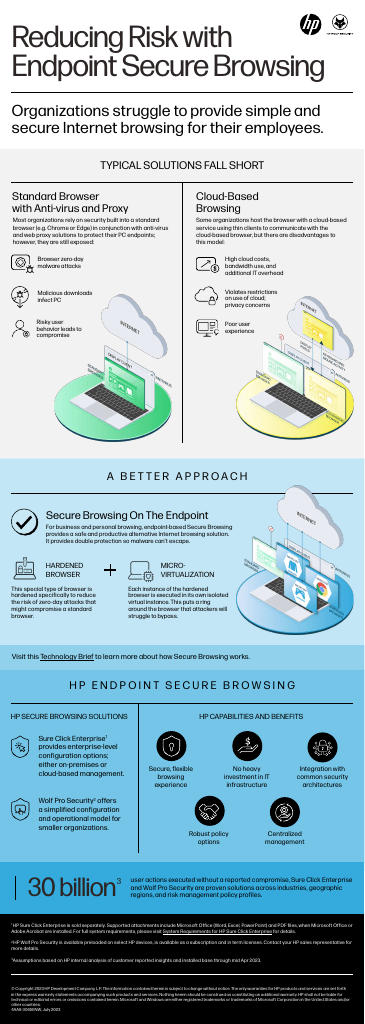
Most organizations rely on security built into a standard browser (e.g. Chrome or Edge) in conjunction with anti-virus and web proxy solutions to protect their PC endpoints. However, they are still exposed to the following threats:
Heading 1
Subtitle 1
Heading 2
Subtitle 2
Heading 3
Subtitle 3
Browser zero-day malware attacks
Malicious downloads
Risky user behavior
Cloud-BasedBrowsing
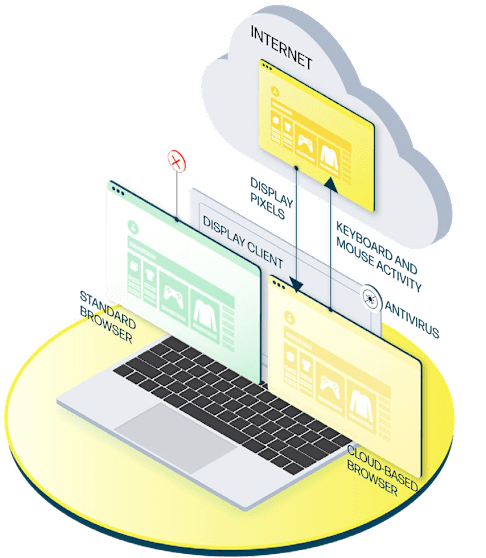
Some organizations host the browser with a cloud-based service, using thin clients to communicate with the cloud-based browser. However, there are disadvantages to this model:
Heading 1
Subtitle 1
Heading 2
Subtitle 2
Heading 3
Subtitle 3
High cloud costs, bandwidth use, and additional IT overhead
Cloud use restrictions violations and privacy concerns
Poor user experience
Anchor: advantage
A Better Approach
Secure Browsing on the Endpoint
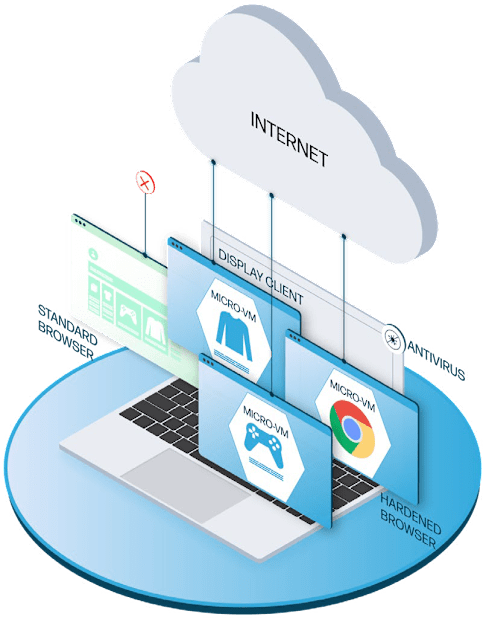
For business and personal browsing, endpoint-based Secure Browsing provides a safe and productive alternative Internet browsing solution. It provides double protection so malware can’t escape.
Heading 1
Subtitle 1
Heading 2
Subtitle 2
Heading 3
Subtitle 3
Hardened Browser
This special type of browser is hardened specifically to reduce the risk of zero-day attacks that might compromise a standard browser.

Micro-Virtualization
Each instance of the hardened browser is executed in its own isolated virtual instance. This puts a ring around the browser that attackers will struggle to bypass.

Visit this Technology Brief to learn more about how Secure Browsing works.
Anchor: security
HP Endpoint Secure Browsing
HP Secure Browsing Solutions
HP Sure Click Enterprise¹ provides enterprise-level configuration options: either on-premises or cloud-based management.

HP Wolf Pro Security² offers a simplified configuration and operational model for smaller organizations.

HP Capabilities and Benefits
Secure, flexible browsing experience
No heavy investment in IT infrastructure

Integration with common security architectures

Robust policy options

Centralized management

Anchor: why
30 billion3user actions executed without a reported compromise, HP Sure Click Enterprise and HP Wolf Pro Security are proven solutions across industries, geographic regions, and risk management policy profiles.
Anchor: Take-the-Next-Step
See HP Wolf Pro Security in Action
Schedule your FREE 30-minute live demo to see how HP Wolf Pro Security’s threat containment stops malware in its tracks.
An HP Representative will contact you to schedule your 30-minute live demo session. Please provide the best email address and phone number to reach you.
Why HP Wolf Pro Security?
Advanced Threat Containment: Isolates commonly used files in micro-virtual machines, stopping malware before it spreads.
Secure Browsing: Combines hardened browsers with virtualization for safe, flexible internet browsing.
Simplified Management: Cloud-based controls make deployment and policy management effortless.
What to Expect in Your Virtual Demo In this exclusive session with an HP Security Tech Expert, you will:
See real-time demonstrations of threat containment using hardware-enforced isolation technology.
Learn how HP Wolf Pro Security protects against phishing, ransomware, and zero-day attacks.
Discover easy-to-use tools for managing endpoint security.
1. HP Sure Click Enterprise is sold separately. Supported attachments include Microsoft Office (Word, Excel, PowerPoint) and PDF files, when Microsoft Office or Adobe Acrobat are installed. For full system requirements, please visit System Requirements for HP Sure Click Enterprise for details.2. HP Wolf Pro Security is available preloaded on select HP devices, is available as a subscription and in term licenses. Contact your HP sales representative for more details.3. Assumptions based on HP internal analysis of customer reported insights and installed base through mid Apr 2023.