• Organizations struggle to enable public Internet browsing without compromising cybersecurity.• Typical approaches include trusting a standard browser’s security, or running the browser in the cloud.
Both approaches have significant security and user experience limitations.
• Endpoint Secure Browsing overcomes these limitations by running a hardened browser in isolation on the employee’s client device (PC).• HP has pioneered the Endpoint Secure Browsing architecture and provides the best of all worlds: security and strong user experience with reasonable operational overhead.
Heading 1
Subtitle 1
Heading 2
Subtitle 2
Heading 3
Subtitle 3
Organizations struggle to provide simple and secure Internet browsing for their employees. It’s difficult because people want to use their corporate-owned device to browse internal resources, work related external sites, and an endless number of sites for personal reasons. This browsing may lead to malware being installed on the endpoint if a malicious file is downloaded from a website. A further risk is from threat actors leveraging zero-day vulnerabilities in the browser or operating system to execute their attack. So how can organizations support a positive browsing experience, while still protecting their business?
Subtitle 1
Subtitle 2
Subtitle 3
Anchor: challenge
Typical Solutions Fall Short
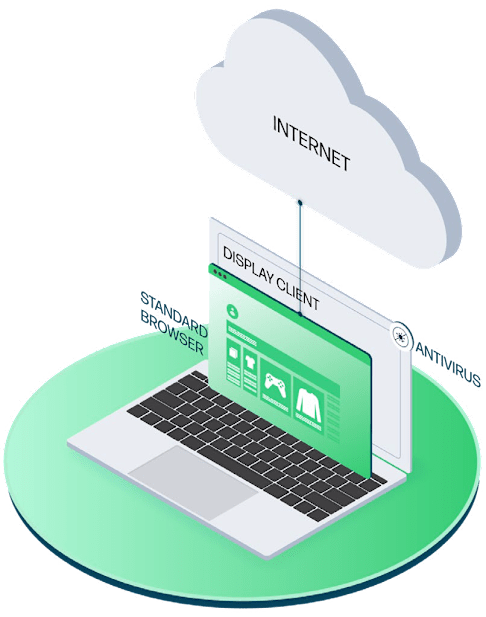
There are two common architectures used to provide Secure Browsing, but both are deficient to some degree: 1. Endpoint-Based Standard Browser with Anti-virus and Proxy
This is the most common approach: hoping that the native security of the standard browser (e.g. Chrome or Edge) along with anti-virus and often a web proxy will somehow limit risk to an acceptable degree. This approach simply fails to provide the level of risk management needed by most organizations, for several reasons:
Subtitle 1
Subtitle 2
Subtitle 3
A variant of this approach is to add network segmentation. External browsing can be limited to endpoints that are segmented from corporate assets. This clearly does limit the ability of attacks to compromise devices on the “internal” side of the segmentation, but falls short in several ways:
Subtitle 1
Subtitle 2
Subtitle 3
Browser Zero-Day Exploits
Browser zero-days are relatively common. Every quarter multiple Chromium patches are published to address zero-day exploits. These vulnerabilities affect all Chromium browsers, including Edge & Chrome. Simply clicking on a malicious link that leverages a zero-day Chromium exploit is all it takes to fully compromise an endpoint.
Malicious Downloads
Content downloaded via browsing can be malicious. This is not the browser’s fault and therefore there is nothing Google or Microsoft can do to fix this. Since most breaches occur on devices running anti-virus and proxies, simply relying on these to detect and block a malicious download is not enough.
Poor User Experience
Users are prohibited from external browsing except on limited devices, a major inconvenience.
Costs and Complexity
Segmentation is difficult and expensive to architect, validate, and maintain.
Risk
Segmentation doesn’t eliminate the zero-day risk, which could still leverage a vulnerability in the browser or operating system.
2. Cloud-Based Browsing
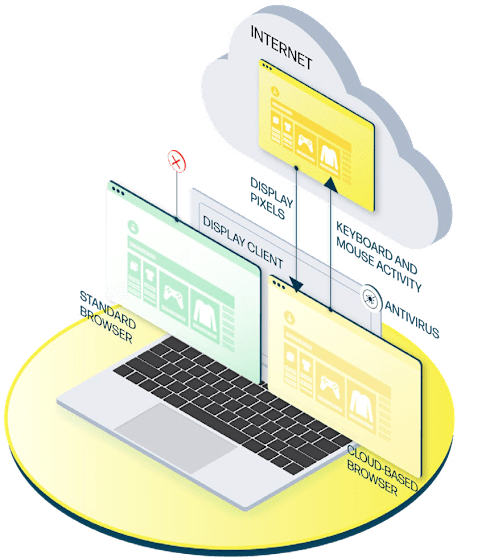
It is possible to run the browser from the cloud, not on the endpoint. A service provider will host the execution of the browser as a cloud-based service. Browser instances are created on an as-needed basis. A thin client on the endpoint exchanges keystrokes, mouse movements and display data with the cloud-based browser over the Internet. This makes it more difficult to compromise the endpoint, however cloud-based browsing has multiple issues:
High Costs
Cloud operating costs, increased bandwidth use, and required staff overhead all can drive costs up.
Cloud and Privacy Concerns
Many organizations restrict the use of cloud technologies or have user privacy mandates, making this approach impractical.
Poor User Experience
Moving the browser to the cloud can cause user experience issues due to degraded performance, or the separation of the browser from the rest of the computing environment.
Anchor: advantage
A Better Approach
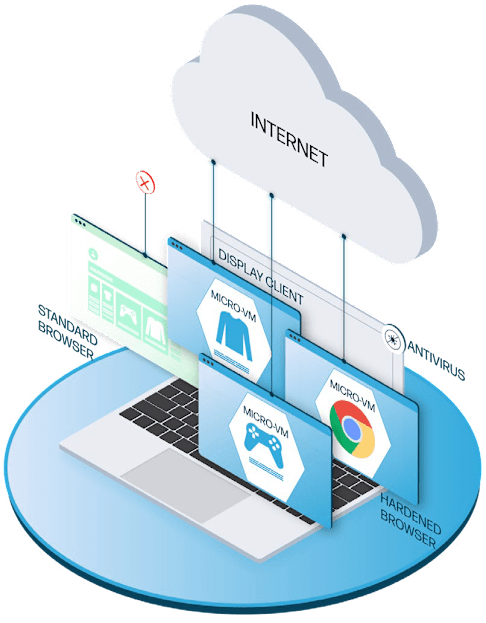
Secure Browsing On The Endpoint Endpoint-based Secure Browsing technology enables safe but productive Internet browsing. It consists of two components:
A special type of Internet browser is deployed on the endpoint. This browser is hardened specifically to reduce the risk of zero-day attacks that might compromise a standard browser.
Micro-virtualization
Each instance of the hardened browser is executed in its own isolated virtual instance on the endpoint. This puts a ring around the browser that attackers will struggle to bypass. The virtual space is enforced by dedicated hardware built into all modern business-class CPUs. This makes it much harder for attackers to defeat and increases performance via hardware acceleration.
When a user browses a website, a hardened browser instance is created in its own dedicated space. This “double protection” Secure Browsing prevents malware from compromising the endpoint. Downloaded content is also run in an isolated container. This approach allows organizations to safely permit access to higher-risk sites that might otherwise have to be blocked, such as personal email and social media. Content upload and download policies can be created based on content type or URL (website), preventing content transfers unless authorized. An even more secure policy option is to run the Secure Browser in read-only mode, allowing users to view websites while preventing them from downloading or uploading data to or from their PC.
Subtitle 1
Subtitle 2
Subtitle 3
Note that the Secure Browsing components are all endpoint-based and not in the cloud. This ensures a consistent user experience and lowers costs by leveraging the investment in the endpoint hardware. It also is compatible with organizational policies that restrict the use of cloud computing or have strict data privacy controls. Secure Browsing is the best of both worlds: users can run the browser and other applications natively on the endpoint for a positive, consistent user experience. Meanwhile the organization enjoys significant risk reduction from one of the most dangerous sources of compromise.
HP pioneered Endpoint Secure Browsing. Its HP Sure Click Enterprise and HP Wolf Pro Security offerings are purpose-built solutions that support easy deployment of Secure Browsing at scale. The...
Secure, flexible browsing experience

No heavy investment in new IT infrastructure

Robust policy options to match employer and employee requirements

Centralized management for efficient operations and consistent policy implementation

Integration with common security architectures and operational models

HP Sure Click Enterprise¹ provides enterprise-level configuration options and either on-premises or cloudbased management. HP Wolf Pro Security² offers a simplified configuration and...
Endpoint Secure Browsing forRisk Management and SuperiorUser Experience
Heading 1
Heading 2
Heading 3
Organizations need to provide flexible, performant browsing for their users, to allow them to do their jobs effectively and enjoy a positive user experience. But they struggle to do so without creating significant risk or incurring higher costs. Secure Browsing based on CPU-enforced isolation solves this challenge. It provides significant reduction in risk from downloaded malicious content or zero-day attacks. Unlike alternative approaches, it maintains strong user experience and performance, and is not cloud-dependent. Therefore, it deserves serious consideration by organizations of all sizes seeking a new approach to the secure browsing experience.
Subtitle 1
Subtitle 2
Subtitle 3
See HP Wolf Pro Security in Action
Schedule your FREE 30-minute live demo to see how HP Wolf Pro Security’s threat containment stops malware in its tracks.
Heading 1
Heading 2
Heading 3
An HP Representative will contact you to schedule your 30-minute live demo session. Please provide the best email address and phone number to reach you.
Subtitle 1
Subtitle 2
Subtitle 3
Why HP Wolf Pro Security?
Advanced Threat Containment: Isolates commonly used files in a micro-virtual machines, stopping malware before it spreads.
Secure Browsing: Combines hardened browsers with virtualization for safe, flexible internet browsing.
Simplified Management: Cloud-based controls make deployment and policy management effortless.
What to Expect in Your Virtual Demo In this exclusive session with an HP Security Tech Expert, you will:
See real-time demonstrations of threat containment using hardware-enforced isolation technology.
Learn how HP Wolf Pro Security protects against phishing, ransomware or zero-day attacks.
Discover easy-to-use tools for managing endpoint security.
1. HP Sure Click Enterprise is sold separately. Supported attachments include Microsoft Office (Word, Excel, PowerPoint) and PDF files, when Microsoft Office or Adobe Acrobat are installed. For full system requirements, please visit System Requirements for HP Sure Click Enterprise for details.2. HP Wolf Pro Security is available preloaded on select HP devices, is available as a subscription and in term licenses. Contact your HP sales representative for more details.3. Assumptions based on HP internal analysis of customer reported insights and installed based through mid-April 2023.