Professional Workstations - Power Emmy-Winning Students Projects
A case study on how Brigham Young University animation program uses HP Z Workstations to produce award-winning student films and games, preparing students for careers in top studios.
Professional Workstations Power Emmy-Winning Student Projects
SPONSORED BY
A CENTER FOR DIGITAL EDUCATION CASE STUDY
It has been a tremendous year for the animation program at Brigham Young University (BYU).
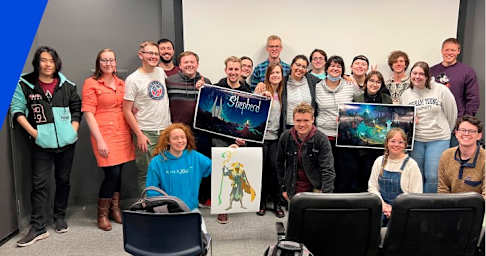
The BYU Center for Animation won a Student Emmy (for the third year in a row), received a Student Academy Award and is a finalist for the 2025 Student Emmys.
“All these achievements were for work created on HP Z Workstations & Solutions,” says Kelly Loosli, professor of animation.
Students come from all over the world to study at BYU, home to more than 35,000 learners.
The opportunity to develop their craft on powerful workstations prepares students of the animation program for their future careers, including the ability to adapt to new technology and processes.
“We run our program like the industry does so our students can go right out of our program to the major studios without any issues,” Loosli says. “If we treat students like they’re already professionals and give them the highest-end equipment we can afford, that transition is seamless.”
Advanced Machines Help Clear Legacy Hurdles
The animation program runs two capstone projects every year: one film and one video game. For each project, student teams must achieve industry-level detail and quality on tight timelines.
“Suddenly you’re pushing gigabytes of data through simulations, renders and games,” says Seth Holladay, associate professor.
“We run our program like the industry does so our students can go right out of our program to the major studios without any issues.” -- Kelly Loosli, Professor of Animation, Brigham Young University
2
In the past, the program used high-performance mainframe computers to power these projects, but those computers can no longer meet the demand for fast turnarounds. With legacy equipment, students had to wait weeks to access the computers, and then they could only run one process at a time.
Today’s machines must be able to produce the groundbreaking visual experiences moviegoers and gamers expect — like generating 3-D effects, dazzling animations and immersive gameplay.
To make workflows more accessible, animation program leaders invested in localized HP Z Workstations & Solutions. This gives student teams the durable, high-performance technology they need to stretch their skills and produce games and films that win awards.
“We try to teach students the tools and then step back and let them run with it,” Loosli says. “Once they know they can really push HP Z, they get excited, and they will go big if you allow them to go big.”
Student Projects Require Reliable Power
Film and video game production is a highly collaborative process, with data coming from teams working on special effects, graphics, musical scores, edits and more.
All the software and data used to produce the animation program’s student films and games runs on powerful HP Z Workstations & Solutions. The workstations constantly pull and push data from centralized servers, allowing dozens of students to work together simultaneously on a single project — just as they would do in any top film studio or video game company.
Recently, the university upgraded its HP Z workstations with additional RAM, which further increased their speed and multitasking capabilities.
Besides the reliability and power to manage large amounts of data, the workstations provide the local access that student teams need to complete work and meet deadlines.
“We rendered an entire short film in two weeks. We had never done that before because the processing power wasn’t there,” Holladay says. “Now it’s like we have our own mini network of processors to push these renders through.”
Because of the collaboration these projects require, the Center for Animation labs are consistently some of the most used on the BYU campus, with workstations running applications constantly.
“We rendered an entire short film in two weeks. We had never done that before because the processing power wasn’t there.” —Seth Holladay, Associate Professor, Brigham Young University
3
Still, the computers stay robust and responsive. This means instructors and professors can focus on teaching rather than solving technical problems. Students get immediate feedback rather than waiting hours or days for processing.
Students also benefit from learning on the same machines and programs they will find in their industry while creating impressive portfolios along the way. When they graduate, these examples will show studios and companies they’re ready to work.
Workstations Deliver Performance and Fuel Innovation
The Center for Animation has partnered with HP since 2002, eventually equipping all of its labs with HP Z.
When it came time to upgrade systems, the program needed a customizable solution that could match industry work environments, quickly adapt to changing production needs and accommodate a complex data pipeline.
“HP was the only company that could build a machine with all the proper processors and up-to-date features that matched our needs,” Holladay says.
With HP Z, the program’s team can customize workstations with different processors, memory, storage, graphics cards and operating systems. For example, they can choose the best graphics cards for their use cases. They also receive valuable guidance from HP’s team of experts.
HP Z has proven to be extremely durable despite demanding workloads.
“We push machines hard, and we need equipment that’s very stable and long-lasting, especially because the university only replaces machines every four years,” Holladay says. “People would get us other vendors’ workstations or networking equipment, and we’d burn out their machines so fast. HP Z has held its own.”
As a result of the powerful workstations available, program leaders continue to challenge students and set ambitious standards for their projects. Students are creating longer films and games with more environments and effects.
These experiences prepare students for the projects and creative solutions they will produce as professionals in their field. Without technological barriers, students can hone their skills and gain the practical knowledge they will need in their careers.
“We push machines hard, and we need equipment that’s very stable and long-lasting, especially because the university only replaces machines every four years.” — Seth Holladay, Associate Professor, Brigham Young University
4
This piece was written and produced by the Center for Digital Education Content Studio, with information and input from HP Z.
Sponsored by HP Z
For decades, HP has been a trusted technology partner around the world. The HP Z Workstations & Solutions portfolio offers high performance laptops, desktops and solutions designed to accelerate demanding workflows.
https://discover.hp.com/aiforeducation
IMAGE SOURCES:
COVER: HP
PAGES 2-4: NEWS.BYU.EDU IS OWNED BY BRIGHAM YOUNG UNIVERSITY. BYU ANIMATION PROGRAM.
Produced by the Center for Digital Education
The Center for Digital Education is a national research and advisory institute specializing in K-12 and higher education technology trends, policy and funding. The Center provides education and industry leaders with decision support and actionable insight to help effectively incorporate new technologies in the 21st century.
www.centerdigitaled.com
©2025 e.Republic LLC. All rights reserved.
https://discover.hp.com/aiforeducation https://www.govtech.com/education